Project
Management Software is an interesting field to study and my article here is
more focused on what I have done so far. A Software Project can be performed by
the Consultant (Vendor) or may also requested from User or An
Internal Development Project and in this article which is covered by Software
Project Consultant who has been designated by the User.
What
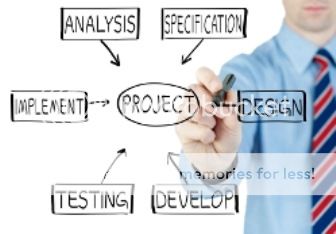
do I do in a software project management is to implement during the SDLC
(Software Development Life Cycle) consisting of :
1.
Project Kick Off
2.
Project Plan
3.
Requirement Gathering & Analysis
4.
Design
5.
Development / Coding
6.
Sistem Integration Test (SIT)
7.
User Acceptance Test (UAT)
8.
Data Migration
9.
Go Live
10. Support and
Maintenance
This is commonly SDLC
flow, sometime each institution has different flow like there is Security
Acceptance Test (SAT) after User Acceptance Test (UAT) stage.
Here is a brief
explanation of matters related to the above:
Project Kick Off
This is the initial
stage of the project. This stage is carried out in a meeting attended by the
User and Consultant Team. User preparing project scope summary and stages as
well as the expected deliverables. This stage takes the form of an official
meeting accompanied by the minutes. Meeting notes will be distributed to all
parties associated with the project and the foundation next activity. At this
stage also specified Person In Charge
(PIC) both from the user and from the Consultant. Project Kick Off is done with
reference to a contract that has been signed or SPK (Surat Perintah Kerja).
Project Plan
Project planning is a
very important stage. At this stage, the project manager made a draft
schedule for the overall project activities, so as to give an idea to everyone
involved in the project. Project managers are also preparing resource to be
included in the project. So the main target of this Project Plan is to get an
idea of when each stage of the project is done and when the completion of
personal as well as anyone involved in the project. It can be made based on
employment contracts that have been made and signed before.
Business Requirement Gathering and Analysis
Defining the problem
is that the essence of a Software Project. Each section / unit / division which
would be the end user of program, must send a representative to this process.
Without representation of any part / unit / division, an assessment needs to be
improper that ultimately will provide software solutions that do not comply
with the requirement.
At this stage it is
often a conflict of interest between operational work by attending meetings
assessment requirement, it is necessary for full support of the leadership of
the company from the user to give priority to this project. Solution is often a
conflict of interest by setting a minimum one representative from each section
/ unit / division involved in the full project from start to finish. So
although there are still operational responsibility, the PIC is still
prioritize his time in the project. To supplement this, the determination of
the PIC should also be accompanied by the establishment of KPI (Key Performance
Indicator) addition to the employee for his involvement in the Software
Project.

Consultants typically
will send Project Manager, Business Analyst and System Analyst her to this
meeting. Project Manager ensures the meeting runs on time, the meeting was
attended by participants expected, meeting set targets and ensure that meeting
the target is reached. Business Analyst studying user needs, create a
hypothesis early, prepare a list of questions and ask to User, record answers
received, conduct needs analysis, prepare minutes of meetings. System Analyst
confirms the current technical capability required by the Business Analyst.
Critical matters will be determined from the technical ability which is confirmed
by the System Analyst in answering the needs of users.
Consultant will
analyze all the results of interviews with this user. Product of this stage is
Functional Specification Document (FSD). FSD will be a reference of all parties
involved in this Project. FSD will be the main reference programmer or engineer
in making / implementing a program where the main content of the FSD is
screen-screen design of the software to be developed and requirement for
system. FSD is wrong will have an impact on software solutions that are not
wrong. Then FSD should be reviewed by the Consultant and User. In this phase,
if FSD is appropriate with requirement and the solution, user must accept and
sign off the FSD.
Design
The design phase will
determine the quality of the software that will be created. In the design phase
be making Process Flow, Data Flow Diagram, Entity Relationship Diagram, Program
and Class Structure Framework and other technical aspects. The whole work is
based on the design phase of FSD as agreed at the previous stage. Design a
solution that will greatly facilitate the creation of programs that will be
developed. Data Flow Diagram of effective and efficient will make the solution
more quickly and more easily realized. Entity Relationship Diagram to determine
the quality of the database to be built. A frequent mistake is not made ERD
accurately so as to produce quality database of redundant and inefficient. DFD
is the data flow of the business process being studied, while ERD is a type of
relationship between two or more entities within the business process. Usually,
product in this stage is Technical Specification Document (TSD). Usually, The
product in this stage is Technical Specification Document (TSD). This document
is contain the matters related technical for implementation which became guideline
for engineer.
Coding /
Development
The
core of the project is the software coding / local development programs.
Generally, the quality of a program based on the quality of the programmer is
concerned. Project Management Software that will either make a complete class
structure and stable as the main framework. By making the structure of class
and standard framework, variations and errors can minimized programmer. Without
it there will be the level of variation and mistakes often high and reduces the
quality of software that is built, to the role of senior developer in a
software project will be very important.
Currently,
many program language options along with its Integrated Development Environment
(IDE), but which is now widely used is Java, PHP, Miscrosoft Visual Studio.
Net, as well as development for mobile platforms such as Android, Apple and
Blackberry. Regardless of differences in the selection of development tools,
application of the concept of Object Oriented Programming (OOP) is a must for
and maintained to provide effective and quality software efficiently, the
concept of class and good framework that will provide convenience and
uniformity in software development. In this stage, the programmer or engineer
will implement the program on development server.
Making Test Script
This
stage is performed in conjunction with phase coding / Development by Business
Analyst with a team of users, the goal is to create a scenario of a complete
and comprehensive test in accordance with the real process desired by the user
so that it can describe the actual process conditions. Test this script must
truly represent the actual story that comes with sample input values and
their expected results. With the test script is complete and comprehensive,
then testing can be done by anyone, although not involved in the early stages
of the software project, where the person who will do the testing, simply enter
the initial value corresponding test script and see if the resulting value is
in accordance with results manual calculations are listed in the test script.
Script test cases should be varied in accordance with the possibility of
variation in the actual process.
System Integration
Test (SIT)
At this
stage, the modules that have been developed will be integrated into a complete
solution. Once integrated, the system will be tested using a test script that
was made before. The test is performed by internal consultants without
involving the user, but the test scripts that are used must already be adjusted
to the wishes of the user and user approved. When the results of the trial are
not in accordance with the results shown in the test script, the program is
still wrong and needs to be fixed. SIT has been completed when all of the input
test script has been tested and the results are in line with those in the test
script. Business Analyst is a PIC that performs testing on the SIT process.
Programmers or Engineer will make the changes necessary to obtain the expected
results corresponding test script.
User Acceptance
Test (UAT)
This
stage is roughly equal to that performed on the stage of the SIT, it's just who
is the user of the part / unit / division related. Challenges that arise at
this stage is to ensure that relevant user can attend UAT schedule in
accordance with the agreed time. An integrated system that usually involves
some part / unit / division, so that the absence of one representative of the
section / unit / division will certain UAT postponed so that the overall
schedule also be disrupted. It is necessary for early approach to each head of
section / unit / division related so as to have the same awareness and
perception of the importance of the software being developed. Although the work
restrictions and limitations with the trial process has been outlined
previously agreed test script, however, is not uncommon at the time of UAT,
user find a variety of testing that did not exist in the test script and the
worst thing is a feature that is not available it should develop by the
programmer. This course will delay the completion of UAT, but if it had to
happen, it must be approved by both parties.
The problem that often occurs is
the consultant is often blamed in the event of a setback schedule for not documenting
in detail the things that a new request for UAT process. UAT process is usually
the most busy / crowded than other stages in the SDLC, because at this stage
all parties involved are usually directly interact with each other, so it is
very wise for a Project Manager to anticipate it as early as possible, one of
which was at the time of requirement gathering and making the test script as
accurate as possible. In addition, the new request handling is good, the
problem of delay completion of UAT can be done well.
Data Migration
Software
created with the aim of replacing manual processes during this happens to be an
automatic process, or replace the old system with a new system that is
considered better, or make additions to the program on existing programs. Any
type of software development mentioned above must go through a stage called
Data Migration or Data Migration. For the implementation of data migration,
some things have to be prepared, namely: preparation of existing data used
manually or used by the old system, making a script to perform a one-time
migration where old data will be uploaded to the new system by using the
migration scripts.
In addition to be prepared is cut off where the data
migration will be done, a notice to all users of the old system when the
cut-off of data will be done and how long the system will be off, making guide
step by step in migrating the data, and the last is making Fall Back Plan
wherein when the migration process fails, then the old data will be returned to
the production enviroment, new system and the old system was reinstated in the
back again. Once all the data is successfully migrated and proven user already
doing final checks on the data migration results in a new system, then the data
migration was completed.
Go Live
This is
a stage where all the SDLC process is complete and the user is able to use the
new system with existing data. After Go Live does not mean there is no problem
anymore, it's often a problem in the system will look at the system Go Live on
production server, but with the handling of a reliable project management
process, this problem should be minimized. Mostly, a consultant will provide
standby on first day live and support if there are problem with system.
Support
To
ensure that the system is running good and stable production after a year,
needed an effective support mechanism, with a Service Level Agreement (SLA)
agreed by User and Vendor. Usually classified as Critical Issue / Stopper,
Urgent, Important, and Nice to Have, and each issue will be solved by criteria
with different SLA contract.
That’s
a brief explanation about Project Management either for Consultant (Vendor) or
Internal Development. I always use it for several project because I'm working
at IT Consultant company. Okay, I hope this article is helpful for you that
assigned within project.
Thanks.